
ANRAN
Shenzhen Anran Security Technology CO.,LtdLifestyle
4.41.45K Reviews
- Version
- 6.2.0
- Installs
- 500.00K
- Age Rating
- Everyone
Screenshots
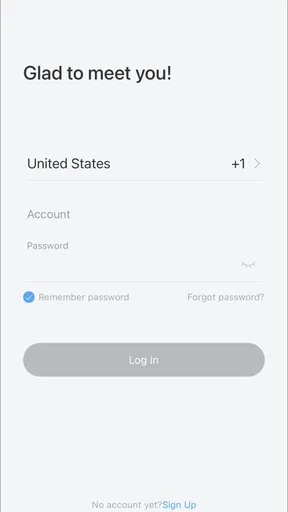
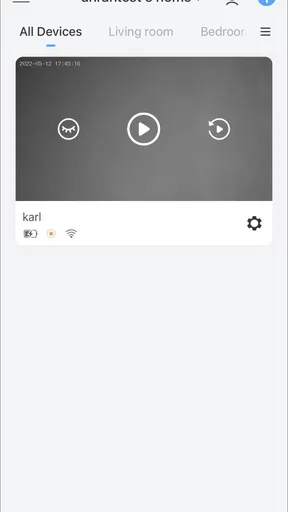
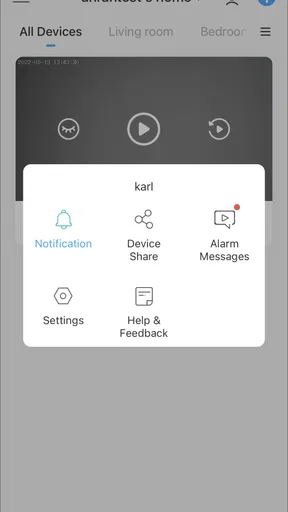
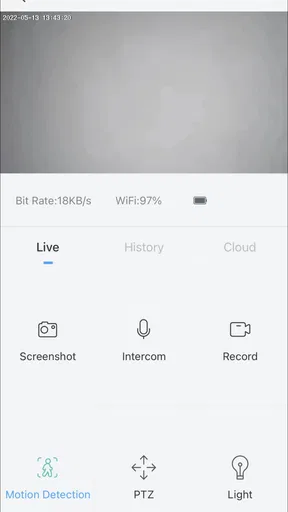
Our Review of ANRAN
 Analysis by Appyee
I would approach ANRAN as a remote-viewing companion for a compatible security setup, not as a general-purpose organizer. That distinction matters: if you are expecting calendars, grocery lists, reminders, or voice-controlled productivity tools, this is not the kind of app you are looking for. Its purpose is to let you check video remotely, so the useful question is whether it fits the way you want to keep an eye on a space when you are away.
That makes it most appealing to someone who already uses ANRAN security equipment or is choosing a camera system and wants a phone-based way to view it. It is less compelling if you simply want to check a room once in a while and do not have a compatible setup. In that case, a camera’s own app or a system you already use may be the more straightforward choice.
Where first-time users can get stuck
Remote video apps depend on more than a successful download. The phone needs to be connected, the camera or security system needs to be set up, and the viewing path needs to work when you are away from the local network. If one part is not ready, opening ANRAN may not immediately show the view you expected. I would treat setup as a chain of separate checks rather than assume the app itself is broken.
For example, if you install it before the camera is configured, the app cannot replace that missing step. Likewise, a blank or unavailable view can point to a camera that is offline, a network interruption, or an incomplete connection process. The practical lesson is to check the equipment and its connection before repeatedly closing and reopening the app.
Small setup checks that save time
Before relying on remote viewing during a trip, I would test the whole routine at home. Open the app while your phone is on the same network as the equipment, then try again with the phone using a different connection. This simple comparison helps separate a local viewing issue from a remote-access issue without changing several settings at once.
It also helps to make sure you know which camera or view you intend to check, especially if more than one device is part of the setup. Give each setup step time to finish before moving on, and avoid repeatedly resetting or re-adding equipment just because the first attempt takes longer than expected. A calm, one-change-at-a-time approach makes it easier to spot where the process is failing.
A sensible recovery workflow
If a view stops loading, I would start with the least disruptive checks: confirm that the phone has a working connection, reopen the app, and see whether the camera or security equipment appears available. If the problem continues, check the equipment’s power and network connection before changing the app configuration. That order is useful because it avoids turning a temporary connection problem into a more complicated setup problem.
For an everyday example, imagine leaving home and wanting to check a room after a delivery. If the view does not appear, first see whether other internet functions on your phone work. Then try again after a short pause. If the equipment is also unreachable from home, the likely issue is not solved by repeatedly tapping the viewing screen; someone may need to check its power or network connection in person.
When the app may not be the cause
Remote viewing relies on the phone, the security equipment, and the network all being available. That creates more possible points of failure than simply opening a locally stored photo or video. A weak connection while travelling can make a live view slow or unavailable, and an interruption at home can have the same effect even when the phone is working normally.
I would also avoid treating a phone app as a substitute for a complete security plan. Remote video can help you check a situation, but it cannot fix a disconnected camera or guarantee that a particular event will be captured. If you need a setup with specific recording, alert, or retention requirements, compare those needs with the full camera system before deciding that the mobile app alone is enough.
ANRAN is a free lifestyle app from Shenzhen Anran Security Technology CO.,Ltd, and its focus is remote video surveillance rather than everyday task management. It has a 4.6 average from around 12,000 ratings, with more than 500,000 installs. The app is rated for everyone, and its current version is 6.0.1; Android users need version 5.0 or later. Optional in-app purchases range from $1.99 to $349.99 per item, so I would check the purchase details carefully before buying anything.
Who is likely to find it useful?
I can see ANRAN working well for someone who wants to check a home, shop, or other space from a phone and is prepared to keep the camera equipment and network in working order. It can also suit a household where one person handles setup and another mainly needs a simple way to look in. In that situation, a quick practice session together is more useful than assuming everyone will know which view to open when something happens.
It is a weaker fit for someone who wants a standalone camera service without checking compatibility, or who needs dependable access in places with unreliable internet. It is also not the right choice for users expecting a full security dashboard to solve power, connectivity, or installation issues automatically. If your priority is organizing tasks or coordinating a calendar, choose a dedicated productivity app instead; that is a different job from remote video monitoring.
How it compares with familiar alternatives
Compared with checking a camera through a browser or relying on occasional in-person checks, a mobile app is convenient because the phone is already with you. The trade-off is that convenience depends on the complete setup being reachable. A browser-based route may suit someone who prefers working at a computer, while a camera maker’s app may be simpler if the equipment is already tied to that ecosystem. I would choose based on the cameras you own and the access method you will actually use, not on a promise of convenience in isolation.
There is also a difference between viewing a live feed and having a broader security workflow. Before making ANRAN the center of that workflow, decide what you expect to do when a view is unavailable, who can check the equipment, and whether the system’s other capabilities meet your needs. Thinking through those questions ahead of time prevents a remote-viewing app from being asked to solve problems that belong to the camera, the network, or the wider security setup.
Practical verdict
My recommendation is conditional: ANRAN makes sense when remote viewing is the specific job you need done and the camera setup is compatible, powered, and connected. It is not a magic fix for a troublesome network, and its usefulness depends on testing access before you are away from home. I would install it, confirm that the intended view works under both familiar and remote conditions, and keep a simple recovery plan for whoever can check the equipment.
If that routine suits you, the app can be a practical way to check a space without being there. If you want broader home-security features, guaranteed access on a poor connection, or a tool for unrelated daily organization, compare alternatives against those needs before committing. The best choice is the one that matches your equipment and your real use case, rather than the one with the most appealing description.
Hey there, app enthusiasts! So, I recently had the chance to get my hands on ANRAN, an app that’s been making waves in the tech community. If you're like me and always on the hunt for the next cool thing to try on your smartphone, stick around because I've got the scoop on everything you need to know about this app.
Getting Started with ANRAN
Diving into ANRAN is like embarking on a new adventure. First things first, the installation process is a breeze. Whether you’re using Android or iOS, the app is free to download, and it doesn't take up much space, which is a relief for those of us constantly battling storage issues.
Once you open the app, you’re greeted with a sleek, user-friendly interface. I’m a sucker for clean design, and ANRAN does not disappoint. Everything is laid out intuitively, making navigation a piece of cake.
Features That Stand Out
Let’s talk features. ANRAN offers a ton of functionalities that cater to a wide range of users. The app's core feature is its ability to streamline daily tasks. Whether it's setting reminders, organizing your calendar, or even managing your grocery list, ANRAN has got you covered.
What really caught my attention was the app’s smart integration with other platforms. You can sync it with your email and other productivity tools, which is a game-changer for multitaskers. And let’s not forget the voice command feature. Simply tell ANRAN what you need, and it takes care of the rest. It’s like having a personal assistant in your pocket!
My Personal Take
So, what’s my take on all of this? Honestly, I’m impressed. I’ve used a ton of productivity apps, but ANRAN manages to stand out with its simplicity and efficiency. The app doesn’t bombard you with unnecessary notifications or ads, which is a huge plus in my book.
I also love how customizable everything is. You can tweak the settings to suit your personal style, whether it's changing the theme or adjusting notification preferences. It feels like the app was designed with the user’s needs in mind.
Room for Improvement
Now, no app is perfect, right? While I’m a fan of ANRAN, there are a couple of areas where I think it could improve. For one, the app occasionally lags when syncing across devices. It’s not a deal-breaker, but something to be aware of if you’re using multiple gadgets.
Additionally, while the voice command feature is awesome, it could be a bit more responsive. Sometimes I found myself repeating commands, which can be a tad frustrating. Hopefully, these are things that can be ironed out in future updates.
Final Thoughts
All in all, ANRAN is a fantastic app if you're looking to boost your productivity without the hassle. It’s like having a little helper that keeps your life organized and running smoothly. Whether you’re a busy professional, a student, or just someone who wants to keep track of daily tasks, ANRAN is definitely worth a try.
So, if you’re curious and want to check it out for yourself, you can easily find it on the App Store or Google Play. Give it a whirl, and who knows, it might just become your new favorite app!
Verdict
Strengths of ANRAN
- User-friendly interface for easy navigation.
- High-quality video streaming with minimal lag.
- Customizable settings for tailored experiences.
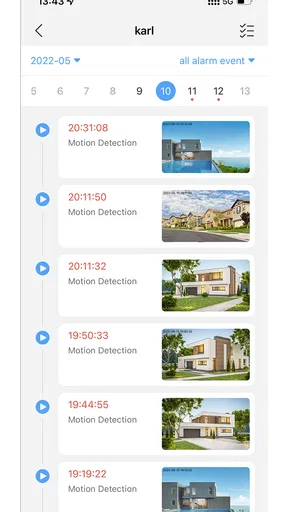
- Efficient motion detection and alerts.
- Compatible with various smart home devices.
Limitations of ANRAN
- Occasional connectivity issues reported by users.
- Some features require a premium subscription.
- Limited customer support response time.
- App updates can be inconsistent.
- Initial setup might be complex for beginners.
Similar Picks in This Category
View All
SmartThings
Samsung Electronics Co., Ltd.4.6

Google Home
Google LLC4.0

Pinterest4.2

Astrotalk - Talk to Astrologer
Astrology & Horoscope4.7

My Verizon
Verizon Consumer Group4.5

Samsung Wallet (Samsung Pay)
Samsung Electronics Co., Ltd.4.1
Frequently Asked Questions
What is ANRAN and what does it offer to users?
ANRAN is a cutting-edge app designed to enhance your security system management. It offers features like real-time video monitoring, motion detection alerts, and remote access to your security cameras. Users can easily manage multiple devices, ensuring peace of mind whether at home or away. The app is available for both Android and iOS.
Is ANRAN easy to set up for beginners?
Yes, ANRAN is designed with user-friendliness in mind. The app provides a straightforward setup process with step-by-step instructions. Most users can have the app and connected devices up and running in less than 30 minutes. Additionally, the app includes helpful tutorials and customer support for any setup challenges.
Does ANRAN require a subscription or are there any hidden fees?
ANRAN offers a free version with essential features, but for advanced functionalities like cloud storage and enhanced alerts, a subscription is required. The subscription plans are competitively priced, and there are no hidden fees, ensuring users can select the best package for their needs without unexpected costs.
How does ANRAN handle user data and privacy concerns?
ANRAN prioritizes user privacy and data security. The app uses encryption to safeguard video feeds and personal information. It complies with industry standards and regulations to protect user data. Users can also customize privacy settings to control who accesses their video streams and data, ensuring a secure experience.
What devices are compatible with the ANRAN app?
ANRAN is compatible with a wide range of smart security cameras and devices. It supports both Android (version 6.0 and above) and iOS (version 11.0 and above). Users should check the specific device compatibility list on ANRAN's official website to ensure their devices are supported before downloading the app.
